Weights & Average Daily Gain
Every weight you log builds a growth history for that rabbit, and OmniBurrow turns it into a chart against what the breed's own standard expects, an average daily gain figure, and a projected butcher date. Your herd settings hold the meat-rabbit targets: a 1.5 oz/day gain, a 72 oz (4 lb 8 oz) butcher weight, and 70 days to get there. All three are yours to change, and breed-specific targets may differ.
Log a weight
There are four ways in, and which you want depends on how many animals are in front of you.
| Way in | Good for |
|---|---|
| The rabbit's own record | One animal you already have open |
| The record-weight screen | One animal, or a batch entered together |
| Barn Scan | A whole row of cages, scanning as you go |
| Data entry sessions | Working down a list without navigating |
- Web App
- Mobile App
Open a rabbit, find the Weights section, and add a weight in pounds and ounces. For several animals at once, go to Dashboard → Data Entry and use the Weights tab.
Tap + (Quick Log) → Record weight, or open a rabbit and use its Weights section. The record-weight screen can target a rabbit, a litter, either as a whole or kit by kit, or a bulk batch built from a litter's kits or from rabbits you pick.
All of it works offline and syncs when you next have signal.
One weight per rabbit per day is kept, so re-entering a day corrects that day rather than adding a second row.
Use Barn Scan. Scan a cage card's QR code, enter the weight, save, and the camera re-arms for the next cage, with no searching for the rabbit in between. Mobile-only, and it works with no signal.
Reading the growth chart
The chart plots each weigh-in against the rabbit's day of life, not the calendar date, so it lines up with where the animal should be for its age. Above the expected line is ahead, below it is behind. Two weigh-ins are the minimum before the chart appears. One point is not a trend.
There are two ways to draw the expectation, and a toggle on the chart switches between them. Your choice is remembered.
Breed standard (the default)
The curve is fitted to the breed's own senior weight from the ARBA Standard of Perfection: fast early growth that flattens as the rabbit matures, which is how a rabbit actually grows. It is anchored at weaning, at eight weeks, and at maturity, so a Netherland Dwarf and a Flemish Giant get very different curves rather than the same straight line.
Alongside it, the show-class weight ranges are shaded in behind the curve, each one only across the ages the rabbit is actually in that class, so a ten-week kit shows its Junior band and nothing else. Dotted lines mark the top and bottom of each range, so you can see at a glance whether an animal is inside its class weight for a show.
Not every breed has a published weight standard in OmniBurrow yet, and some define a weight for only one class. Where a figure is missing it is worked out from the breed's size instead and the band says (est.), so you know which is which. A custom breed, or a rabbit with no breed set, falls back to a general-purpose curve. The bands also need a date of birth. Without one there is no way to know which class the rabbit is in on a given day, so the curve is drawn without them.
Fryer target
The other view is the meat-rabbit one: a line climbing at your ADG target until it reaches your target butcher weight, then holding flat. It answers "is this animal on track to be a fryer on time", which is a threshold to reach rather than a growth curve, so it stops at the target instead of climbing forever, and a rabbit kept past its butcher date no longer has an expectation line running off the top of the chart.
Use this view for grow-outs and the breed-standard view for breeding stock and show animals.
Average daily gain
ADG is the plain thing it sounds like: total weight gained divided by the days between the first and the last weigh-in, shown in ounces per day beside the chart.
Because it spans the whole recorded history it smooths out a single bad weigh-in, which also means a rabbit that grew fast early and then stalled still reads reasonably. To see the stall, look at the shape of the chart rather than the single number.
ADG is aggregated elsewhere too, per litter, per line, and per grow-out group, where it becomes the figure worth comparing between families and feeds. See Feed & Feed Conversion.
Projected butcher date
OmniBurrow projects when each rabbit reaches your target butcher weight:
- With a weight recorded: it takes the latest weight, works out how much is still needed to reach your target weight, divides by your ADG target, and counts that many days from today.
- Already at or above target weight: the projection is today, not a stale date from before the animal was ever weighed.
- With no weight yet but a date of birth: it falls back to the date of birth plus your target butcher age, 70 days by default.
- With neither: there is nothing to project from, and no date is shown.
The projection moves every time you weigh, which is the point: it answers "when is this batch ready" from what the animals are actually doing, not from a plan made at birth.
Bulk weighing
For a whole litter or grow-out batch, weigh in bulk rather than one record at a time.
- Web App
- Mobile App
Dashboard → Data Entry → Weights gives you one date and a row per animal. It needs a connection.
Two options, both offline-capable:
- Record weight → Bulk: pick a litter and it loads that litter's kits as rows, or pick the rabbits yourself. One date covers the batch, and any row that fails validation is skipped and reported rather than blocking the save.
- Rapid entry: choose Weights, choose which animals are in scope, and work down the list.
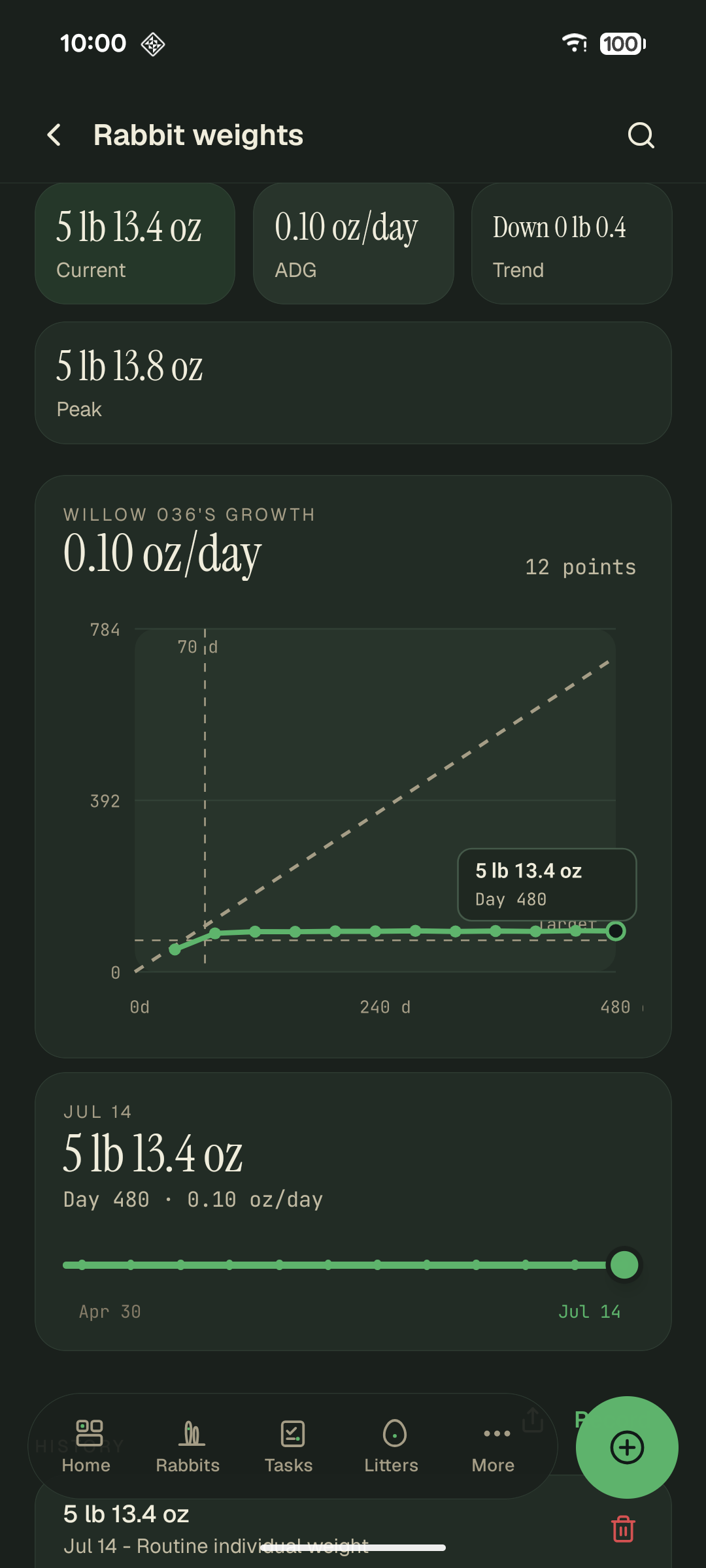
Every weigh-in extends the curve. The tiles are current weight, average daily gain, the trend since the previous weigh-in, and the heaviest reading on record. This is the fryer-target view on a mature doe well past butcher weight, so her curve is flat beneath the dashed target lines, which is grow-out's climbs.