Pedigrees
A pedigree in OmniBurrow is generated from the sire and dam links on your rabbit records, not typed out and maintained as a document. Record a parent once and every descendant's pedigree updates, because they all read the same records. You can view the tree on screen, check it against ARBA's registration requirements, and export it as a PDF.
How a pedigree is built
Each rabbit record points at a sire and a dam. Those rabbits point at their own parents, and so on — the tree is assembled by following those links as far back as your records go. There is no separate pedigree document to keep in step.
Two consequences are worth knowing:
- Fixing one link fixes everything below it. Correct a grandmother's variety, or attach a parent that was missing, and every pedigree containing her is right from that moment on.
- A pedigree is only as deep as your records. A great-grandparent you never recorded is a blank box, not a guess. Nothing is invented to fill space.
The on-screen chart shows the full depth you have recorded, and pans and zooms. The PDF is the standard three-generation pedigree: the rabbit, its 2 parents, 4 grandparents, and 8 great-grandparents.
View a pedigree
- Web App
- Mobile App
Open a rabbit and scroll to the Pedigree section. Drag to pan, scroll to zoom, and use the minimap in the corner to find your way around a large tree. Show genetics overlays each rabbit's known loci onto the cards.
Open a rabbit and expand the Pedigree section. It reads the copy of your herd held on the phone, so it renders with no signal.
Alongside the chart, OmniBurrow checks the pedigree against what ARBA registration requires and tells you what is missing:
- A left-ear tattoo recorded on the rabbit.
- A complete three-generation tree — all 2 parents, 4 grandparents, and 8 great-grandparents.
- The same breed throughout those three generations.
- A recognized exact variety, rather than a custom one, on the rabbit and its required ancestors.
- A name or ear number on every rabbit in that span, with names inside ARBA's 30-character guidance.
- A pedigree weight on each of them, in ARBA's pounds.ounces form —
10.04means 10 lb 4 oz. - The rabbit being at least six months old, from its recorded date of birth.
Three things it deliberately leaves to you, because they cannot be read from your records: whether the rabbit meets its breed's senior weight standard, whether it is free of disqualifications, and whether you and any co-owners hold current ARBA membership. Those need a registrar and a physical examination.
Export a PDF
- Web App
- Mobile App
From the rabbit's pedigree section, open the PDF options and generate. You can set the accent colour, the buck and doe colours, the page frame, the card style, the font, whether photos are included and whether they print circular or square, whether genetics are shown, and whether the subject's name is left blank for a buyer to fill in. Save those choices as your defaults so every future pedigree matches.
From the rabbit's Pedigree section, export the PDF. Online you get the same file the web app produces, and it is kept on the phone, so reopening it does not re-download or regenerate it.
Offline, the phone renders its own visual copy from local data — the same three generations, the same layout, so you can hand a buyer a pedigree standing in the barn.
Filling gaps
A blank box means that ancestor is not in your records yet. Two ways to fill it:
- Add the ancestor as a rabbit record and set it as the parent. Give it the ownership status Reference: that is what the status is for: rabbits you do not own, recorded so a pedigree is complete.
- Import the pedigree document. If you have the paper or a PDF, pedigree import reads the ancestor boxes and creates them for you, linking to rabbits you already own wherever the registration number or ear tag matches exactly.
Sending a pedigree to a buyer
A PDF is a picture of a pedigree. If the buyer also uses OmniBurrow, send them the records instead: a pedigree transfer hands over the rabbit and its whole ancestry as live records in their account, so their future litters carry the lineage properly.
When you record a sale and the buyer has an email address on file, OmniBurrow emails them the receipt with the pedigree PDF attached and a link to claim the transfer — you do not have to send anything separately. See Deposits & Sales.
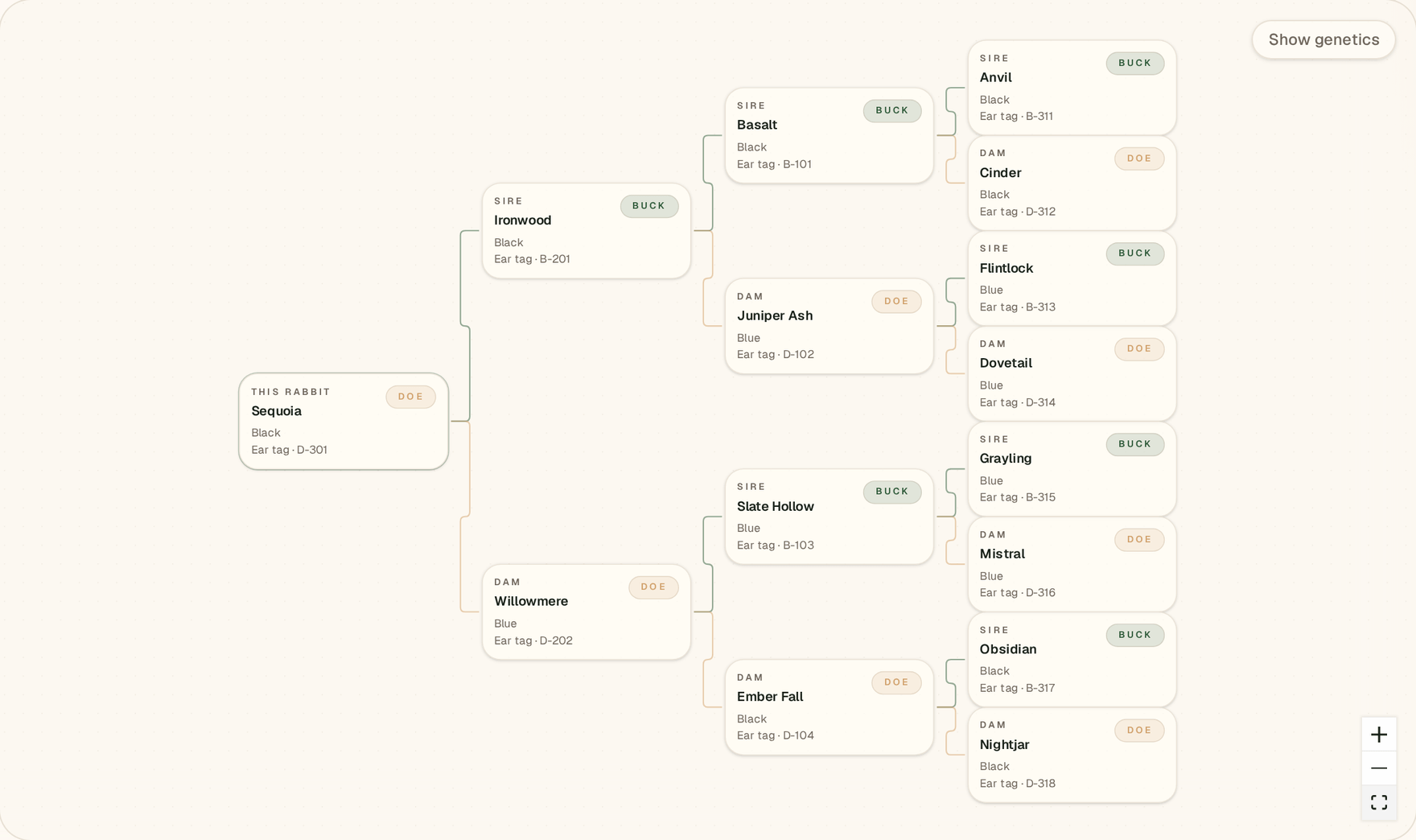
Web app: the chart reads left to right — the rabbit, then sire and dam, then their parents. Pan and zoom it, or use Show genetics to put the inferred locus chips on every node.