Cage Cards
A cage card is the printed summary that hangs on the hutch: who the animal is, its ear number, date of birth, and a QR code linking back to its record. Both apps produce them — the web app is where you print a whole filtered batch, the mobile app renders them offline from the copy of your herd on the phone. The card itself is identical either way, because both apps share the same renderer.
What is on a cage card
Cards come in three flavours, and you pick which when you print.
Barn cards are the everyday one: name and sex, breed and variety, ear number, date of birth with the age worked out, and cage number. On the larger size they also carry sire and dam, breeder, registration and grand champion numbers, latest weight, pedigree weight, optional genetics, and your notes.
They also carry a warning you will want: a rabbit inside a medication withdrawal period prints with ⚠ Withdrawal until and the date, right on the card on the cage.
Show cards swap in what a show table needs — the computed age class, the ear number, date of birth and age on the show date, registration number, and exhibitor, plus a row for the breed's weight standard against the rabbit's own weight, and blank Coop # and Placement lines to fill in on the day. Legs print as a count out of three.
Anything missing prints as a write-in line rather than being dropped, so a rabbit with no recorded date of birth still gets a labelled blank to complete by hand.
Meat pen and fryer cards show the class, age in days, weight, and whether the animal is currently eligible, or says it needs a weight if you have not recorded one.
Print for one rabbit
- Web App
- Mobile App
Open the rabbit and print its cage card from there.
Open the rabbit and use the cage card action. Pick the card type and size, and the phone renders and prints or shares it — this works with no signal, because it is generated on the device from local data.
Print a batch
- Web App
- Mobile App
Filter the rabbits list to what you want — a sex, a status, a search — then print cage cards for the whole filtered set. Three layouts: compact at 6 per page, 3 × 5 at 4 per page, and 4 × 6 at 2 per page.
This is the route for a show weekend or re-carding the barn after a move.
The rabbits list can print a batch for the filtered set too, in the same sizes. Offline, like everything else here.
Litter cage cards
A litter gets its own card: doe and buck, the litter's dates and counts, and — on the larger size — its feeding schedule and genetics. It hangs on the nest-box cage and its QR code scans to the litter rather than to a rabbit.
The QR code
The QR encodes the record's web profile URL, which is what makes it useful twice over:
- Anyone can scan it with a phone camera and land on that rabbit's page in the web app. Useful at a show, and useful for a buyer looking at an animal.
- Barn Scan reads it to identify the animal instantly, which is what turns a row of cages into a weight or health session without searching for each rabbit.
Barn Scan is tolerant about what it accepts — a full web URL, an app deep link, or a bare record ID all resolve, so cards printed by either app, at any time, keep working.
Customizing the layout
Cage card appearance is set once in settings and applies to every card either app prints:
- Header colour and card font.
- Whether to include your rabbitry name, your contact line, and your logo in the header.
- Whether to print genetics on barn cards.
There is a live preview beside the settings, so you can see the result before spending paper. Your rabbitry contact line also pre-fills the exhibitor field on show cards.
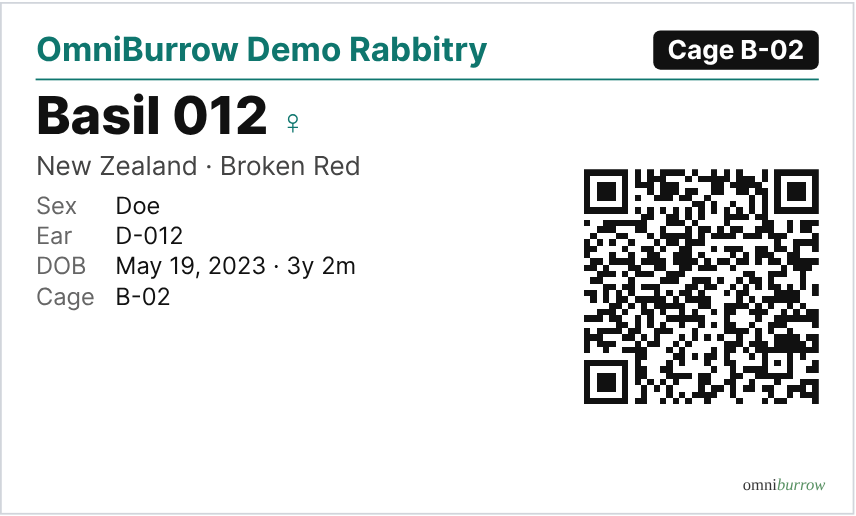
A cage card as it prints. The QR code opens that rabbit's profile, and Barn Scan reads it.