Finding your way around
The web app puts everything in one menu down the side; the mobile app keeps five things in the bottom tab bar and files the rest under More. Both apps hold the same features — they are just arranged for different screens. On either app, search gets you anywhere faster than the menus do.
The web app
The menu runs down the side of the dashboard:
| Menu item | What is there |
|---|---|
| Dashboard | Herd counts, what is due, recent activity |
| Rabbits · Litters | Your herd and your breedings |
| Genetics | Predict offspring, breeding match, COI |
| Analytics | Seven tabs: overview, production, harvest, feed, lines, shows, health & care |
| Health · Inventory | Health events and treatments; feed, supplies, medications |
| Harvest | Processing records |
| Finance · Contacts | Ledger, deposits, sales; buyers and waitlist |
| Marketplace · Pedigree shares | Public listings; transfers to and from other accounts |
| Tasks · Data Entry | Reminders and recurring work; bulk entry sessions |
| Partner | The Willow assistant |
| Import data | CSV, pedigree, and backup imports |
| Tools · Settings · Account | Maintenance jobs; preferences; billing, export, deletion |
Feed, grow-out groups, lines, and shows do not have their own menu items on the web — they live inside the Analytics hub and on the rabbit record itself.
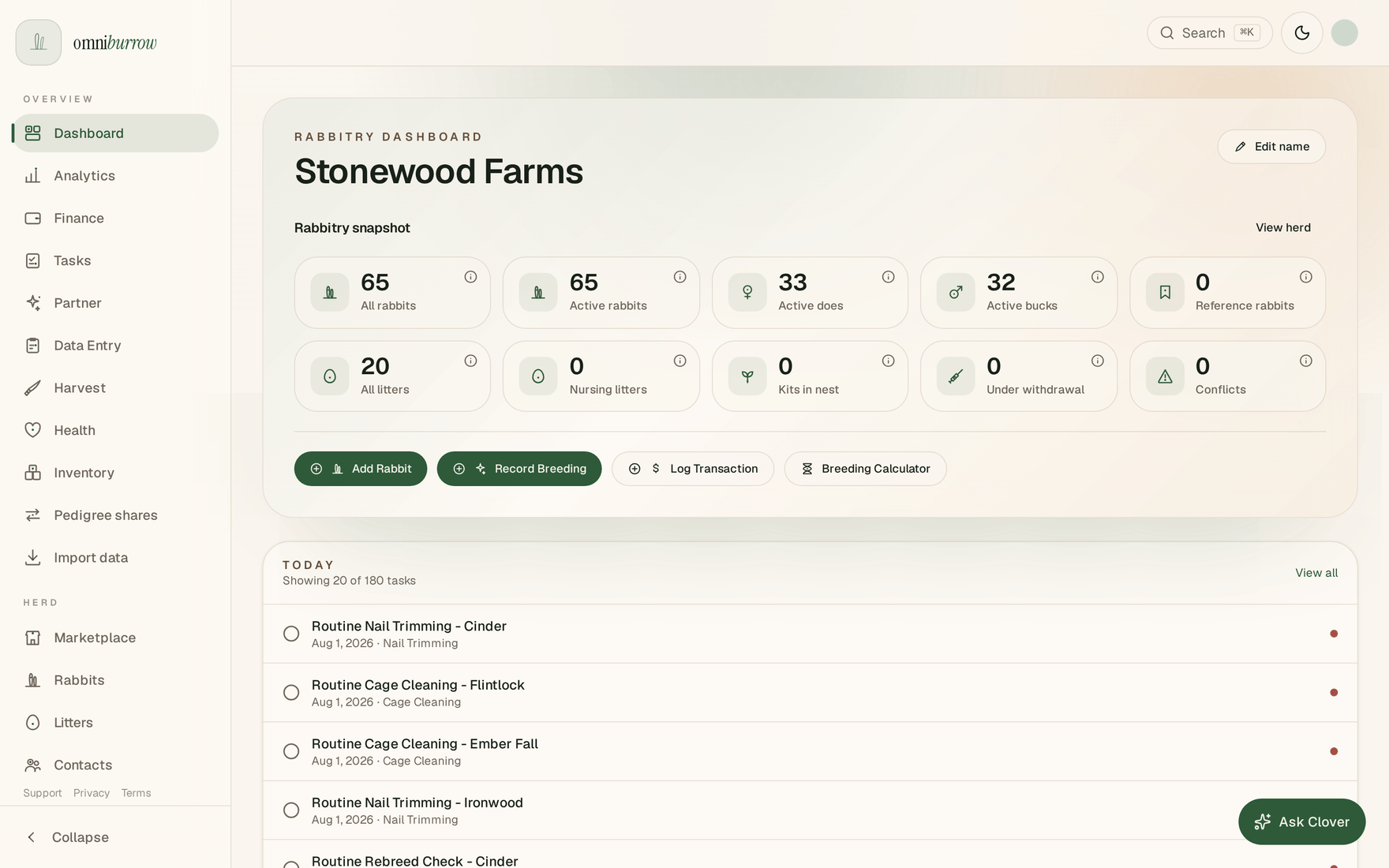
The side menu is grouped — Overview first, then Herd, Breeding, and System.
The mobile app
Five tabs across the bottom: Home, Rabbits, Tasks, Litters, and More. The green + button floating above them is Quick Log.
Everything else is grouped under More:
- Daily care: Barn scan, Weights, Health, Feed, Inventory, Rapid entry
- Herd: Lines
- Business: Contacts, Finance, Marketplace, Pedigree shares, Processing, Shows
- Insights: Analytics, Genetics, Import, Willow
- System: Settings, Tools
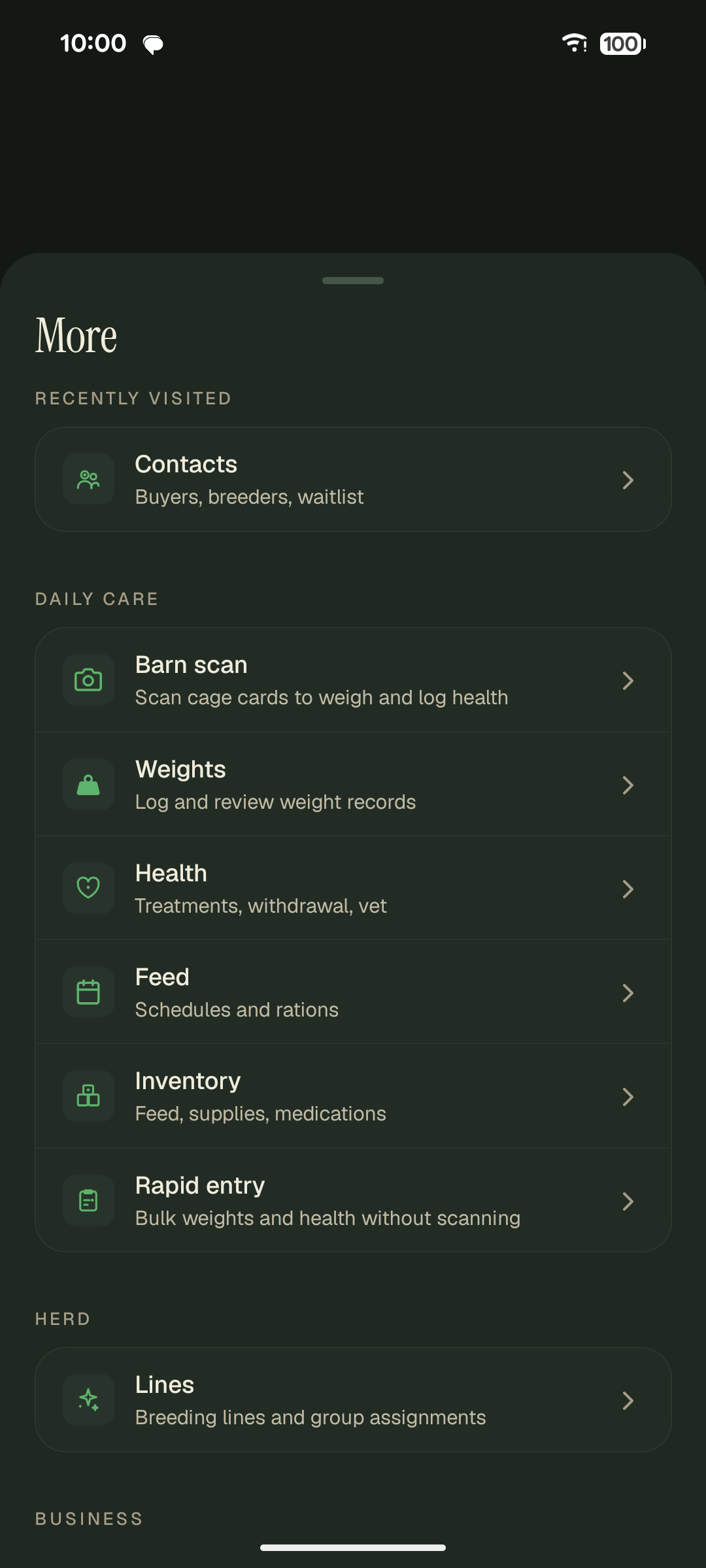
Everything that is not a bottom tab lives under More.
The More menu also keeps a Recently visited shortcut at the top, so whatever you used last is one tap away.
What is only on one platform
- Barn Scan is mobile only — it needs the camera, and it is the fastest way to log weights or health for a whole row of cages.
- Batch cage-card printing is web only. Mobile can produce cage cards too, including the QR code Barn Scan reads; the web app is where you print a filtered set of them at once.
- Subscribing happens on the web app only.
- Offline search is mobile only. Both apps have global search, but only the phone can run it with no signal, because only the phone holds a local copy of your herd.
- Willow is on both, despite what older versions of these docs said: a full chat page plus a floating assistant on the web, and its own screen under More on mobile.
The complete row-by-row breakdown is in the Feature Matrix.
Finding things fast
Search looks across rabbits, litters, contacts, inventory, and grow-out groups at once, and it jumps to screens too — typing "genetics" takes you there instead of making you hunt for it. Rabbits match on name and ear tag, contacts on name, email, or phone, and litters and grow-out groups on cage number.
- Web app: click Search in the top bar, or press ⌘K (Ctrl-K on Windows and Linux). Arrow keys move through results, Enter opens one, Escape closes.
- Mobile app: tap the magnifier in the header. It works offline, because it runs against the copy of your herd already on the phone.
Quick Log is the green + above the mobile tab bar: record a weight, note, or health event in a couple of taps without navigating anywhere first.
The web app also keeps its per-page search where that is more useful — the Rabbits list has its own search and filters, and pickers like sire, dam, and contact search as you type.