Shows & Entries
A show entry records one rabbit at one show: the class it went in, where it placed, the judge, and whether it earned a leg. OmniBurrow counts the legs for you and, on the third, records the date and asks for the rabbit's grand champion number. Entries work offline on the phone.
Add a show
There is no separate "show" record to create first. A show exists as the name and date you type on an entry, so recording a show means recording its first entry.
Each entry carries the show's name, date, location, and judge alongside the rabbit's own result, which means two rabbits at the same show are two entries that share those details.
Enter rabbits
- Web App
- Mobile App
Open the rabbit and add an entry from its Show record section.
Open Shows, or the rabbit's Shows section, and add an entry. This works offline.
An entry records:
| Field | Notes |
|---|---|
| Show name and date | Required |
| Show class | Free text, e.g. "Senior Buck" |
| Placement | Required: see below |
| Leg earned | Whether this result counted as a leg |
| Class winner | Won its class |
| Exhibits in breed | How many were shown against it |
| Judge, location | Optional |
| Judge comments, notes | Optional |
Show class here is a text field you type, not a computed one. That is deliberate: you write what the show actually called the class. The computed age class is a separate thing, used on cage cards — see below.
Record placings
Placement is one of Best of Breed, Best Opposite Sex, 1st, 2nd, 3rd, Best in Show, Best Reserve in Show, or no placement.
The field that does the most work is leg earned. OmniBurrow counts legs per rabbit, shows the count on its record and cage cards, and watches for the milestone:
When you save the entry that takes a rabbit to three legs, OmniBurrow records the date it earned grand champion, remembers which entry did it, and prompts you for the GC number. You do not have to track the count yourself.
Already had legs before you started using OmniBurrow? There is a legacy legs action that adds between one and eight legs to a rabbit in one go, so its count is right without inventing show records that never existed.
Age classes
Cage cards show the class a rabbit competes in, and that one is computed — from the breed's class scheme, the rabbit's date of birth, and the show date. You never type it.
Which scheme applies depends on the breed. Every breed is recorded as either four-class or six-class, seeded from the ARBA Official Breed ID Guide:
| Scheme | Junior | Intermediate | Senior |
|---|---|---|---|
| Four-class | under 6 months | — | 6 months and over |
| Six-class | under 6 months | 6 to under 8 months | 8 months and over |
Six-class is the large and giant breeds. The boundaries are exact calendar months from the date of birth, evaluated against the show date, so a rabbit born on 3 March is a senior in a four-class breed from 3 September.
No date of birth means no computed class. On a show cage card the class prints as a blank line for you to write in, rather than being guessed or left off. The same is true of the ear number.
More on how breeds and varieties are catalogued: ARBA Breeds & Show Classes.
Reviewing show history
Each rabbit's record carries its own show history and leg count. Across the herd, Shows Performance totals entries, legs, Best of Breed, Best Opposite Sex, Best in Show, and grand champions, and — because lines can filter the analytics — lets you ask which family is actually winning.
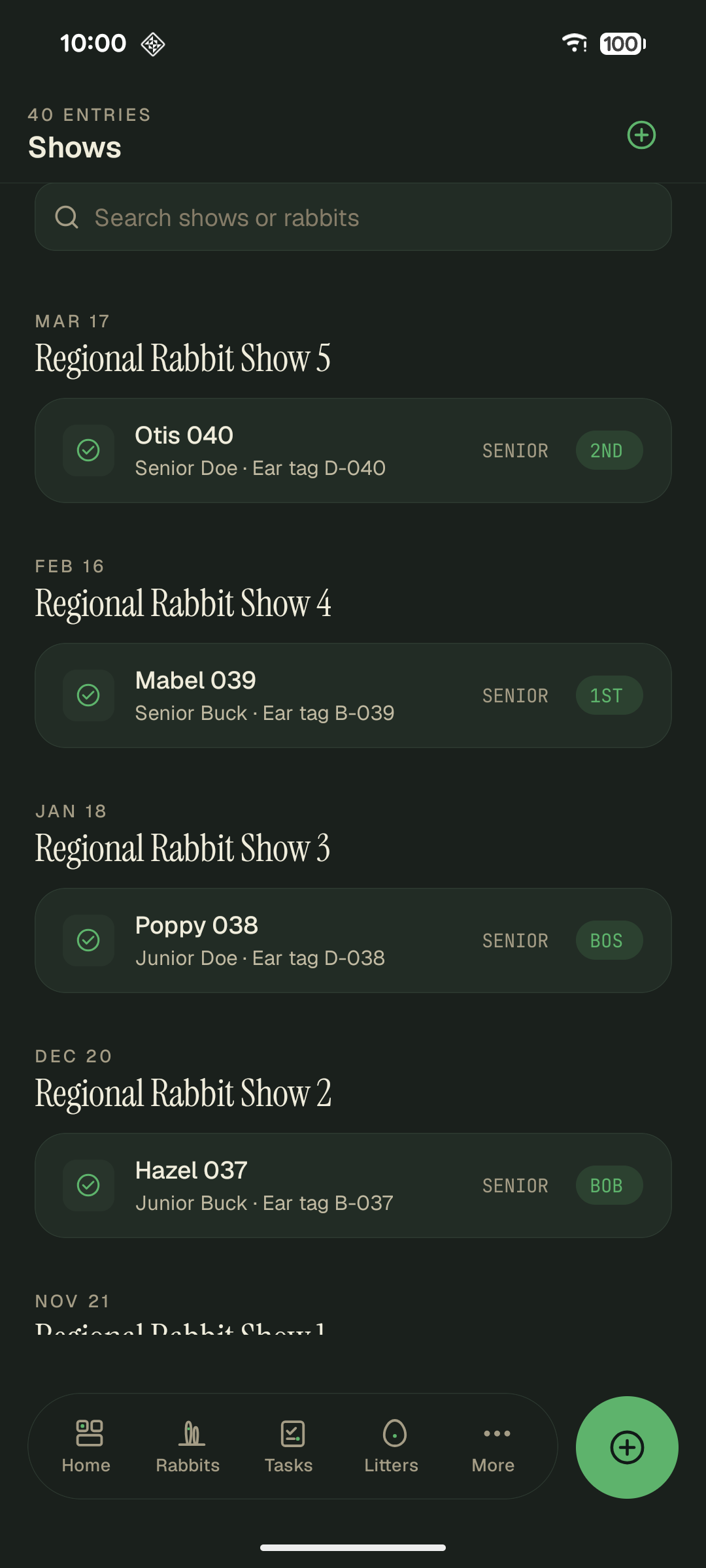
Entries group under the show and its date. The grey chip is the age class OmniBurrow computes from the breed scheme, the date of birth and the show date, not the class text you typed, so the two can disagree if an entry was recorded under the wrong class.