Predict Offspring
Pick a buck and a doe and OmniBurrow tells you what the litter is likely to look like — a ranked list of varieties with a likelihood for each, plus the pairing's projected coefficient of inbreeding. It works from the genotypes it has inferred from your own herd's records, so the answers sharpen as your pedigrees deepen. On the phone the whole calculation runs on the device, with no signal needed.
Run a prediction
- Web App
- Mobile App
- Go to Dashboard → Genetics.
- Choose the sire and the dam.
- Read the projected COI, the likely varieties, the per-locus Punnett outcomes, and any warnings.
The web app needs a connection for this. Offline it shows each parent's stored COI and says the simulation is unavailable rather than guessing.
- Open Genetics, or start from a rabbit's Genetics section, from a litter, or from Quick Log.
- Choose the sire and the dam.
- Read the COI, the varieties, and any warnings.
This runs on the device, so it works in the barn with no signal. Record this breeding carries the pair straight into a new litter.
Reading variety predictions
The result is a ranked list of varieties, capped at the top 12, each with a number from 0 to 100.
Two things about those numbers are worth understanding:
- They are shares of the list, not absolute probabilities. Once the top 12 are chosen, the figures are scaled to add up to 100. A variety at 40 is roughly twice as likely as one at 20, but the 40 is not a claim that 40% of the litter will be that colour.
- Long shots are dropped, not hidden. A variety whose raw odds come out below 2% is treated as noise and left off the list, which is what stops it becoming every colour the breed has ever thrown.
A high-scoring variety is the likely outcome, not the guaranteed one. Rabbits do not read the list.
Reading COI
The projected COI is the coefficient of inbreeding the kits would have — the probability that two copies of a gene are identical because they came from a shared ancestor. It comes with a depth, telling you how many generations of pedigree went into it.
The depth is the part to pay attention to. COI is only as deep as your recorded pedigree, so a shallow pedigree gives a low number for the honest reason that OmniBurrow cannot see far enough back to find the shared ancestors. The web app says so directly when the pedigree is incomplete.
For what the values mean — full siblings 25%, half siblings 12.5%, first cousins 6.25% — and how they are calculated, see Genetics Engine and Lines & COI.
Why some odds are not 100%
Pair two rabbits whose colour genetics are fully known and the prediction reproduces the classic Punnett square exactly — the same counts out of four you would work out by hand.
Sub-100% odds appear when OmniBurrow is not certain what a parent carries, and that uncertainty is deliberate. Evidence from a grandparent is not proof about the parent: a recessive that surfaced two generations back means the parent has a 50% chance of carrying it, and three generations back, 25%. Rather than rounding that up into a fact, the engine carries the probability through to the result.
The practical consequence is that a recessive colour which could appear shows up at honest odds, instead of a confident number the pedigree does not support, which is the answer you actually want before making the pairing. How the evidence is weighted is set out in Genetics Engine.
Predictions also carry warnings and flags when a pairing looks risky — lethal combinations, or a conflict between what your records say and what the genetics allow.
Offline behavior
On mobile, prediction is a local calculation rather than a request. The genetics engine, the variety catalog, and the COI calculation are all on the device, so a prediction in a shed with no bars returns an answer. When you are online the phone uses the server's calculation instead, which has your full pedigree available to it.
The web app needs a connection.
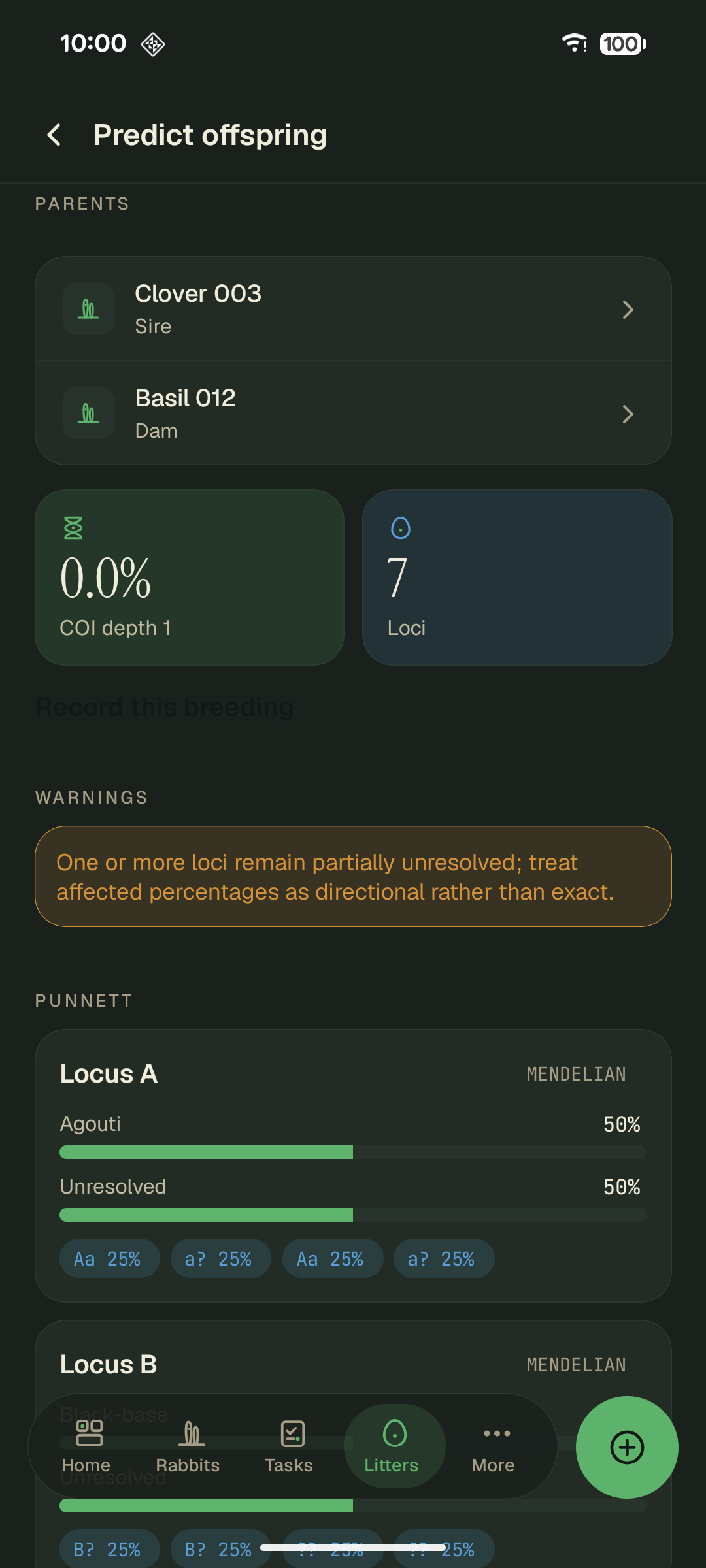
Projected COI comes with a depth. Depth 1 means the pedigree only goes back one generation, so a low number is a limit of the records rather than proof the pairing is unrelated. The question marks are alleles the engine will not guess at, which is why that locus reports Unresolved instead of a confident percentage.