Litters & Kindling
A litter record starts the day you put a doe and a buck together and follows the same animals through palpation, kindling, and weaning. Recording the breeding date is enough for OmniBurrow to work out the expected kindling date and lay out the reminders that go with it; recording the kindling date adds the rest. All of it works offline on the phone.
Record a breeding
A litter needs a doe. A buck is optional, but worth setting — it is what makes the kits' pedigrees, genetics, and sire analytics work.
- Web App
- Mobile App
Go to Dashboard → Litters and add a litter. Pick the doe and buck, set the date bred, and save. There is a link straight from the form to predict what the pairing is likely to produce.
Open the Litters tab and tap +. Pick the doe and buck, set the date bred, and save. You can also start from a prediction: run Predict Offspring and tap Record this breeding, which carries the pair into the new-litter form.
A litter record holds the doe and buck, the dates (bred, palpated, expected, kindled, weaned), the kit counts, a cage number, notes, and an outcome.
Expected kindling
You do not have to work the date out. Expected kindling is the date bred plus your gestation setting — 31 days by default — and you can override it by typing a date in yourself.
Saving a litter with a date bred also generates its reminders:
| Task | When | Setting |
|---|---|---|
| Palpate | 14 days after breeding | Days until palpation |
| Expected kindling | 31 days after breeding | Days of gestation |
| Nest box | 27 days after breeding | Days until nest box |
Those day counts are yours to change in herd settings, and every task is named after the doe, so a day's list reads as a list of animals. Editing the litter regenerates them — correcting a date bred moves the whole chain instead of leaving stale reminders behind.
It lands three days before the doe is due, which is exactly when the box should go in. It appears in Tasks & Reminders with everything else due that day, and can push a notification to your phone.
Record the kindling
When the kits arrive, set the date kindled and the counts:
- Total born: everything in the box, alive or not.
- Live kits: how many are alive.
- Dead kits is worked out for you, as total born minus live kits. You do not type it, and live kits cannot exceed total born.
Setting the kindling date generates the second half of the task chain:
| Task | When | Setting |
|---|---|---|
| Check nest box | the day after kindling | fixed |
| Re-breed check | 35 days after kindling | Days until re-breed |
| Wean kits | 42 days after kindling | Days until wean |
| Separate males | 56 days after kindling | Days until separate males |
Nest checks
The check-nest-box task the day after kindling is usually where the live count gets corrected — first-day losses are common, and the number you wrote at 6am is often not the number by evening.
Update live kits on the litter whenever that changes. The count matters beyond the litter screen: it is what the kit tracking on Kits & Phenotype Buckets reconciles against, and it is what warns you when the kits you have recorded individually or in groups no longer add up to the number you say are alive.
Litter outcomes
Not every breeding produces kits, and recording that honestly is what makes doe analytics worth reading. A litter carries one of three outcomes, or none while it is still in progress:
- Kindled: kits arrived.
- Miss: the doe did not conceive.
- False pregnancy: she behaved pregnant and did not kindle.
Marking a litter Miss or False pregnancy clears the kindling and weaning dates and the kit counts, because none of that happened. Set the outcome date so it lands in the right period.
Those outcomes feed Production & Does, where each doe gets a conception rate alongside her miss and false-pregnancy counts. Herd-wide, the mortality rate is total dead kits divided by total born, and average litter size is measured in live kits, so both are only as good as the counts you keep.
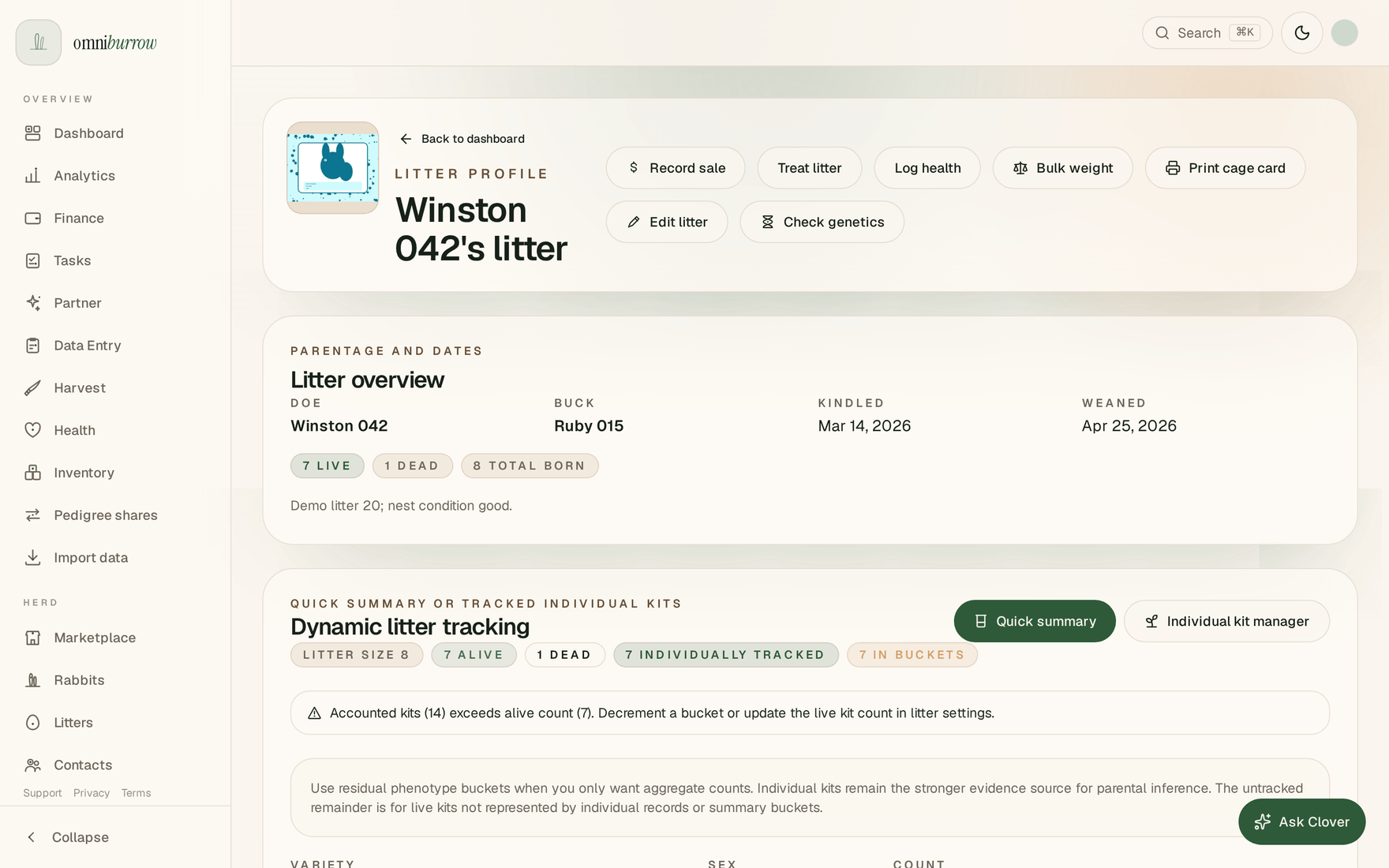
Web app: a litter profile. Dynamic litter tracking is where kits become individual records or stay as a counted bucket, and it warns you when the two stop adding up.